
Supercharge Your WordPress with 160+ Modules

160+ modules for security, performance, SEO, media, admin, and more. Zero bloat because you only load what you enable. Faster sites, fewer conflicts, one dashboard. Made for developers and agencies who are tired of plugin bloat.

Showing 160 of 160 modules
Active (104) | Inactive (56)
Display Active Plugins First
Show active plugins at the top of plugins list separated from inactive plugins
Admin Color Schemes
Create custom admin color schemes with primary and secondary colors
Admin Columns Manager
Manage, reorder, hide, and customize admin list table columns for all post types
Admin Logo Customizer
Upload custom logo for WordPress admin area to replace default branding
Admin Menu Organizer
Reorder, rename, hide, and reorganize admin menu items using drag-and-drop
Admin Menu Separator
Add visual separators to admin menu sidebar to organize menu items
Clean Admin Bar
Remove unnecessary items from WordPress admin bar for cleaner toolbar
Clean WP Dashboard
Remove unnecessary WordPress dashboard widgets and clutter
Compact Tables
Ultra-compact post and page list tables with reduced padding and spacing
Content Report Widget
Dashboard widget showing content statistics and insights
Custom Admin CSS
Add custom CSS styles to WordPress admin dashboard
Custom Admin Footer Text
Customize footer text in WordPress admin dashboard
Custom Dashboard Welcome Panel
Create custom welcome panel with personalized content and quick links
Dashboard Columns Settings
Choose dashboard layout columns between one to four column arrangements
Disable Admin Bar (Frontend)
Hide the WordPress admin bar on website frontend for all users
Disable Dashboard Widgets (Selective)
Choose which default dashboard widgets to disable
Enhanced List Tables
Add featured image, excerpt, word count, and more columns to post tables
Featured Image Column
Show featured image thumbnail in posts and pages list
Footer Timezone
Show current WordPress timezone timestamp in admin footer
Gutenberg Block Control
Enable or disable specific Gutenberg blocks from block inserter
Hide Admin Bar (By Role)
Hide admin bar on frontend for specific user roles
Hide Admin Menu Items
Selectively hide specific admin menu items from sidebar navigation
Hide Admin Notices
Hide admin notices, update nags, and plugin promotional messages
Login Page Customizer
Customize WordPress login page design with logo, colors, and styling
Move Switchboard to Tools
Move WPSwitchboard menu item from main admin menu to Tools submenu
Options Page Builder
Create custom admin pages with settings panels to store site options
Plugin Role Control
Control which user roles can activate, deactivate, install, or delete plugins
Show IDs
Display database IDs in admin list tables for posts, pages, and users
Site Identity Login
Use site logo from Site Identity settings as login page logo
Storage Monitor
Monitor disk space usage with dashboard widget showing storage breakdown
Wider Admin Menu
Increase admin menu sidebar width for better readability
Accessibility Widget
Frontend accessibility widget with font size controls and contrast adjustments
Auto Featured Image
Automatically set first image in post content as featured image
Auto Publish Missed Schedule
Automatically publish posts that missed their scheduled publication time
Breadcrumbs
Add customizable breadcrumb navigation with Schema.org markup
Bulk Page Creator
Quickly create multiple standard business pages with predefined templates
Change Post Type
Convert posts to pages, pages to posts, or any post type to another
Content Expiration
Set expiration dates for posts and pages to automatically unpublish content
Content Exporter
Export posts, pages, and custom post types to CSV or JSON format
CPT Builder
Create custom post types with visual interface without coding
Custom Body Class
Add custom CSS classes to body tag based on page template or conditions
Custom Field Groups
Create custom field groups and meta boxes for posts and pages
Custom Frontend CSS
Add custom CSS styles to website frontend without editing theme files
Custom Post Meta Display
Display custom post meta fields on frontend with shortcodes
Custom Post Order
Reorder posts and pages with drag-and-drop interface
Custom Taxonomy Builder
Create custom taxonomies like categories and tags for any post type
Custom Taxonomy Order
Reorder categories, tags, and custom taxonomy terms with drag-and-drop
Default OG Image
Set default Open Graph image for social media sharing
Disable Comments
Disable WordPress comments system completely or for specific post types
Duplicate Post Button
Add duplicate/clone button for quick content duplication with metadata
Email Obfuscator
Automatically obfuscate email addresses to prevent spam harvesting
Estimated Publish Date
Add estimated publish date field to draft posts for editorial planning
External Links New Tab
Automatically add target blank to external links to open in new tabs
External Permalinks
Set posts or pages to redirect to external URLs
Post Views Counter
Track and display post view counts with lightweight tracking
Public Preview Drafts
Share draft posts with clients via secure URLs without login
Reading Time
Calculate and display estimated reading time for posts and pages
Related Posts
Display related posts based on categories, tags, or custom taxonomies
Remove CPT Base
Remove custom post type base slug from URLs for cleaner permalinks
Social Share Buttons
Add social sharing buttons for Facebook, Twitter, LinkedIn, and more
Table of Contents
Auto-generate table of contents from post headings with anchor links
User Role Body Class
Add user role as CSS class to body tag for role-based styling
Username Body Class
Add username as CSS class to body tag for user-specific styling
AVIF Support
Enable AVIF image format uploads for next-generation compression
Block Video Uploads
Prevent users from uploading video files to save storage space
Custom Image Sizes
Define custom image sizes beyond WordPress defaults
Default Featured Image
Set default featured image as fallback for posts without one
Image Sizes Panel
Display all registered image sizes in media library with dimensions
Image Upload Rename
Automatically rename uploaded images to SEO-friendly slugs
Media Categories
Add categories to media library for better organization
Media Infinite Scroll
Enable infinite scroll in media library grid view
Media Rename
Rename media files after upload directly from media library
Media Replacement
Replace existing media files while maintaining URLs and references
Regenerate Thumbnails
Regenerate all image sizes for existing images
Resize Images on Upload
Automatically resize large images to maximum dimensions on upload
SVG Support
Enable SVG file uploads and proper display in media library
Unused Media Finder
Find and delete unused media files not attached to any content
WebP Conversion
Automatically convert uploaded images to WebP format
Disable Thumbnail Generation
Prevent WordPress from generating multiple thumbnail sizes
Download Media Library
Export media library or selected months as ZIP files
Image Watermark
Automatically add watermarks to uploaded images with customizable settings
Database Optimizer
Optimize WordPress database by cleaning revisions, spam, and transients
Disable Dashicons (Frontend)
Disable Dashicons icon font on frontend for logged-out users
Disable Embeds
Disable WordPress oEmbed functionality and REST API endpoint
Disable Emoji
Remove emoji detection script and styles from WordPress
Disable Feeds
Disable RSS feeds if you don't use them
Disable Gutenberg
Disable the Gutenberg block editor and restore classic editor
Heartbeat Control
Control WordPress heartbeat API frequency or disable completely
Revisions Control
Limit number of post revisions kept or disable completely
Transients Cleaner
Clean expired transients from database to improve performance
Database Cleaner
Comprehensive database cleaning with revisions, spam, and orphaned data removal
Activity Log
Track and log user activities including logins, post changes, and settings updates
Disable All Updates
Disable automatic WordPress, plugin, and theme updates completely
Disable Application Passwords
Disable WordPress application passwords feature
Disable Author Archives
Disable author archive pages to prevent username enumeration
Disable File Editing
Disable WordPress file editor for themes and plugins
Disable REST API
Disable or restrict WordPress REST API access
Disable XML-RPC
Disable XML-RPC functionality to prevent brute force attacks
Force SSL Admin
Force admin area and login pages to use HTTPS connection
Hide WordPress Version
Remove WordPress version number from meta tags and feeds
IP Whitelist/Blacklist
Control access to admin area by IP address
Limit Login Attempts
Limit login attempts to prevent brute force attacks
Login ID Type
Control login authentication method - email only, username only, or both
Obfuscate Author Slugs
Replace author usernames in URLs with randomized strings
Password Protection
Add password protection to entire site or specific pages
Security Headers
Add HTTP security headers to protect against common attacks
Username Blacklist
Prevent registration of common usernames like admin or root
Two-Factor Authentication
Add 2FA with TOTP apps, email codes, and backup recovery codes
Cloudflare Turnstile
Privacy-focused CAPTCHA protection for login, registration, and forms
Google reCAPTCHA
Protect forms from spam and bots with Google reCAPTCHA v2 or v3
Magic Login
Passwordless login via secure email links or 6-digit codes with QR support
Email/SMS Verification (OTP)
Simple OTP login verification via email or SMS after credentials
Simple CAPTCHA
Self-hosted CAPTCHA with math problems, text questions, and images
Alphabet Avatars
Generate colorful letter-based avatars from user initials
Last Login Column
Add last login timestamp column to users list table
Local User Avatar
Upload custom avatars locally instead of using Gravatar
Login As User
Switch to another user account instantly for testing
Login/Logout Menu
Add dynamic login/logout links to navigation menus
Multiple User Roles
Assign multiple roles to single user combining capabilities
Redirect After Login
Set custom redirect URLs after login based on user role
Registration Date Column
Add user registration date column to users list table
Simple Role Editor
Edit WordPress user roles and capabilities with visual interface
Simplified Profiles
Remove unnecessary fields from user profile pages
Temporary Login
Create temporary login URLs with expiration for support access
User Exporter
Export user data including email, role, and custom fields to CSV
User Meta Display
Display custom user meta fields on profile pages and author archives
Username Changer
Allow users or administrators to change WordPress usernames
View Admin As Role
View admin area as different user role to test permissions
404 Redirect
Redirect 404 error pages to homepage or custom URL
Ads.txt Manager
Create and manage ads.txt file for authorized digital sellers
Alpine.js Enqueue
Enqueue Alpine.js framework from CDN for reactive interfaces
AI Alt Text Generator
Automatically generate alt text for images using AI vision models
Auto Dark Mode
Automatically switch between light and dark mode based on system preferences
Broken Link Checker
Scan posts and pages for broken links and images
Code Snippets Manager
Manage reusable CSS, JavaScript, and HTML code snippets
Coming Soon Mode
Display coming soon page with countdown and email collection
Conditional Redirects
Create conditional redirects based on user role, device, or referrer
Custom Excerpt Length
Customize excerpt length and change Read More text
Custom Fonts Manager
Upload and use custom fonts without external services
Customize WP Mail Defaults
Customize default WordPress email sender name and address
Download Plugin ZIP
Download any installed plugin as ZIP file for backup
Download Theme ZIP
Download any installed theme as ZIP file for backup
Email SMTP
Configure SMTP settings for reliable email delivery
Header & Footer Code
Insert custom code in header or footer without editing theme files
Lean Analytics
Simple privacy-focused analytics without external services or cookies
Link Shortener
Create short URLs with your domain for affiliate links and tracking
Maintenance Mode Enhanced
Display maintenance page with countdown during updates
Performance Monitor
Monitor page load times, query counts, and memory usage
Quick Debug Toggle
Quickly enable or disable WP_DEBUG from admin bar
Redirects Manager
Create and manage 301, 302, and 307 redirects with regex support
Remove Unused Themes & Plugins
Identify and remove inactive themes and plugins
Robots.txt Editor
Create and edit robots.txt file with visual editor
Search Visibility Status
Display warning when site is set to discourage search engines
Simple Forms
Create simple contact forms with visual builder and spam protection
System Summary
Display comprehensive system information for troubleshooting
Track 404s
Track all 404 errors with URL, referrer, and timestamp
Tracking Codes Manager
Manage tracking codes for Google Analytics, Facebook Pixel, and more
WP Mail Logging
Log all outgoing emails to troubleshoot delivery issues
Favicon Generator
Create custom favicon using letters, emojis, or upload custom icon
Simple Backups
Download WordPress components as ZIP files for backup
Powerful Features

What You Get

A cleaner WordPress admin, faster workflows, and fewer plugins to worry about.

Lightning-Fast Search

Find any module or setting instantly. No more hunting through menus.

Type to search → Instant results

One-Click Activation

Enable or disable any feature with a toggle. No complex configs, no plugin conflicts.

Toggle on/off → Instant activation

Command Launcher

Access any module instantly with Ctrl/Cmd + K. Like VS Code, but for WordPress admin.

Cmd+K → Type module name → Enter

Zero Bloat

Only load what you actually use. Disabled modules don't run any code, so your site stays fast.

Load only what you use → Better performance

One-Click Import/Export

Export your config and import it to any new site. Set up once, reuse everywhere.

Export config → Import to new site → Ready to go

Intuitive Interface

A clean, modern design that makes the WordPress admin less painful to use daily.

Beautiful design → Easy to use
View All Features

⚡ 7-day money-back guarantee • Instant access • Save $2,000+

WordPress Problems vs Solutions

Before and After

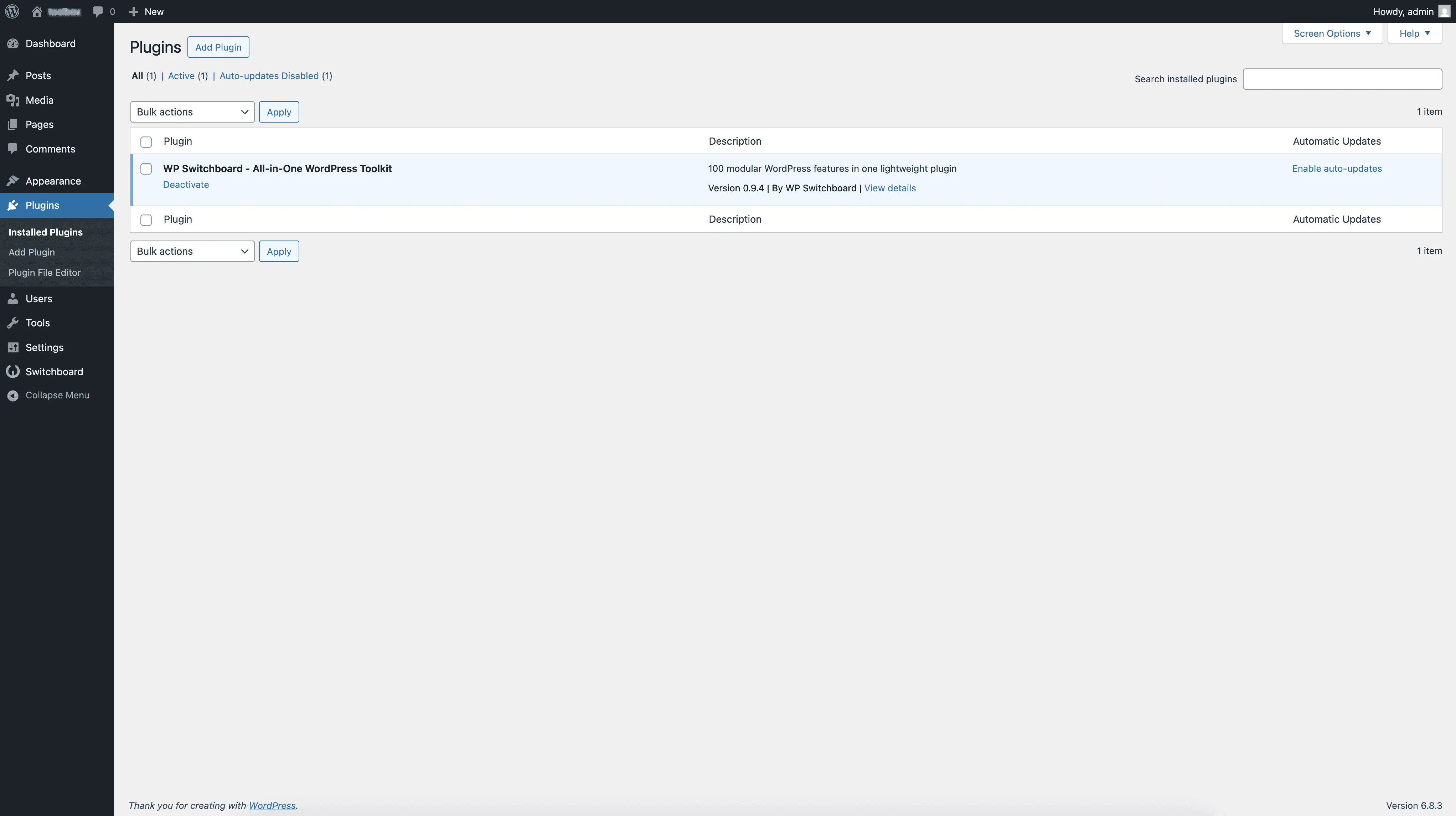
What default WordPress admin looks like vs. what it looks like with WPSwitchboard modules enabled. Drag the slider to compare.
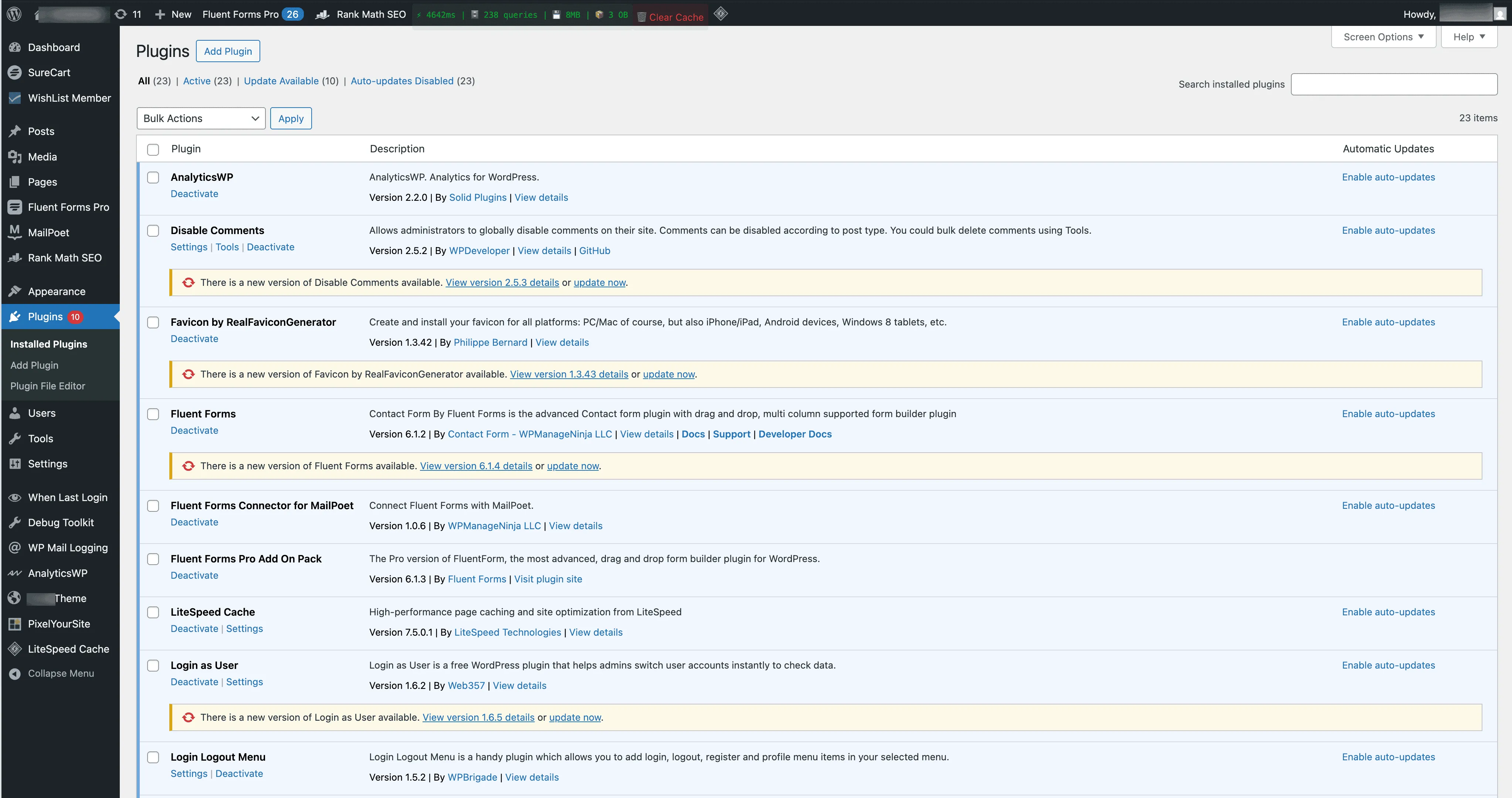
Default WordPress Admin
WPSwitchboard Admin
BEFORE
AFTER
Default WordPress Problems

Common pain points

Frustrations that come with managing WordPress out of the box

Overwhelming Menu Structure

Cluttered admin with dozens of confusing menu items, making it hard to find what you need.

Slow Loading Times

Multiple plugins causing conflicts, bloated code, and frustratingly slow page loads.

Confusing for Clients

Clients struggle with complex interfaces, leading to support requests and frustration.

No Customization Options

Limited ability to customize the admin experience to match your workflow and brand.

Result: Frustration

Wasted time, confused clients, and endless plugin conflicts

With WPSwitchboard

How WPSwitchboard helps

The same admin, but cleaned up and optimized for your workflow

Organized, Intuitive Navigation

Clean, organized admin menu with only the tools you need, exactly where you expect them.

Lightning-Fast Performance

One plugin replaces many, so fewer database queries and less code loading on each page.

Client-Friendly Interface

You can hide menu items and simplify the admin so clients only see what they need.

Fully Customizable

160+ modules let you enable exactly the features you want without extra plugins.

Result: Success

Happy clients, efficient workflow, and professional results

Transform Your WordPress Get WPSwitchboard

Ready to Make the Switch?

Get lifetime access to all 160+ modules for $349. Use on unlimited sites, get all future updates.

⚡ 7-day money-back guarantee • Instant access • Save $2,000+

Why Choose WPSwitchboard?

Stop buying plugins one by one. Get everything in one place.

Save $2,000+

160+ modules for the price of one premium plugin. Do the math.

Build 10x Faster

Pre-built modules that work out of the box. Less time setting up, more time building.

Code You Can Trust

Every module is tested and maintained. No abandoned code, no mystery conflicts.

Only Load What You Need

Turn off what you don't use. Disabled modules don't load any code.

Always Up-to-Date

We update for each WordPress release. Your modules keep working.

Expert Support

Stuck on something? We actually respond to support tickets.

160+
Modules
7
Categories
10x
Faster Setup
Zero
Plugin Conflicts

Ready to save $2,000+ and eliminate plugin clutter?

HOW IT WORKS

Simple Steps to Get Started

Install, activate the modules you need, and you're done. No complicated setup.

1. Signup & Get Lifetime Deal

Grab the lifetime deal. No subscriptions, no renewals.

2. Install the Plugin & Activate

Download and install the WPSwitchboard plugin, then activate it on your WordPress site.

3. Enable / Disable Modules

Pick and choose from 160+ modules. Enable what you need, skip what you don't.

4. Customize Module Settings

Tweak each module's settings to fit how you work.

BETA LAUNCH: Only 100 Lifetime Deals Available!

Unlimited Access to WPSwitchboard

All 160+ modules, unlimited sites, lifetime updates. One payment: $349 $249 . Pay once, use forever. No recurring fees, no subscriptions, no limits.

🚀 BETA EXCLUSIVE

Unlimited Lifetime Access

Full access to every module, no restrictions. Install on as many WordPress sites as you want, forever.

$349
$249 lifetime
Save $100

One-time payment. No subscriptions. No renewal fees.

Everything you get:

All 160+ WordPress modules
Admin customization tools
Content management modules
Media handling & optimization
Security & performance tools
User management features
All future releases included
Priority beta support

⚡ Instant access • 7-day money-back guarantee • Lifetime updates

7-Day Guarantee

Full refund if you're not satisfied

Secure Payment

SSL encrypted checkout process

Instant Access

Download immediately after purchase

Frequently Asked Questions

Everything You Need to Know

Common questions about WPSwitchboard, pricing, and how it all works.

Ready to eliminate plugin clutter and save thousands?

"I was honestly skeptical at first, but using WPSwitchboard has made my WordPress admin workflow so much smoother. I can manage multiple client sites efficiently, and my clients are always impressed with the enhanced admin experience. The modules just work, and the support team is super responsive."
– AJ, Web Developer & WordPress Specialist

Join 5,000+ developers who've eliminated plugin clutter

WPSwitchboard

160+ Modules.
One Plugin. Done.

Security, admin tools, performance, SEO, and more. All in one place.

Get Lifetime Access - $349 $249
Core Modules
160+
Admin Tools, Security, Optimization, and more
Enhance your WordPress admin experience
Admin Tools
Dashboard Enhancements
Customize admin interface
Security & Performance
Optimization Modules
Secure & optimize your site